Top 8 best AI tools to restore water-damaged photos in 2026
Water is the absolute worst enemy of old family photographs. A leaky roof, a flooded basement, or a spilled drink can instantly ruin a physical…
 EnhanceIT
PRO
EnhanceIT
PRO
📚 Complete Guide: The Complete Guide to AI Photo Enhancement in 2026
Sometimes when we see our family album it reminds us of our previous life and it looks beautiful to remember them but their black and white resolution changes the emotions and you, enhancing your old photos.
We researched for you and found easy ways and tools to enhance your images online. The interesting thing is you don’t have to pay to restore your old photos. Let’s dive into more details!
Try it yourself!
Use our free AI Image Enhancer tool – no signup required.
[
Try AI Image Enhancer Free →
](https://enhanceit.pro/)
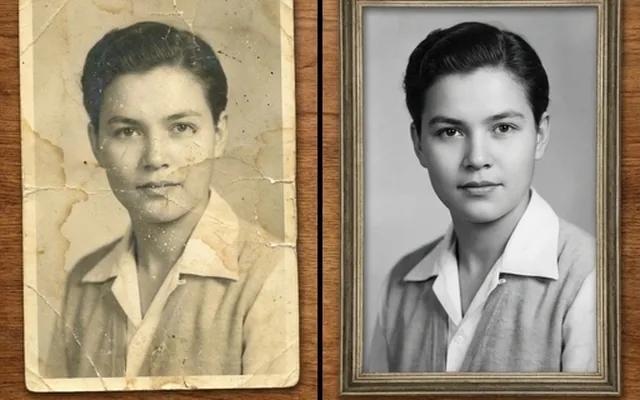
It is a common question among people why enhance their old images if they like them in that old shape so we want to inform you that enhancing your old image can breathe new life into it. It will look like the new digital images and your kids also can relate to it easily.
We have some easy-to-follow steps for you by following those you can restore your images easily.
Follow the steps to restore your black-and-white image with Photoshop:
Step one starts with uploading your image in Photoshop to edit. The image will be your background layer don’t make any adjustments on it.
This will be an empty layer where you will make all adjustments. By doing this you are making changes on a separate layer instead of the real image and this process is known as non-destructive edits. In this method, all adjustments will be on an upper layer without harming the original picture.
In the toolbar section click on sample all layers, then select the created layer and use the brush where you want to heal up your image.
For this, you can hold Alt and Option on Mac, and select the area you wish to sample. Make sure you enable the option “current layer and below” because you use this tool for non-destructive editing.
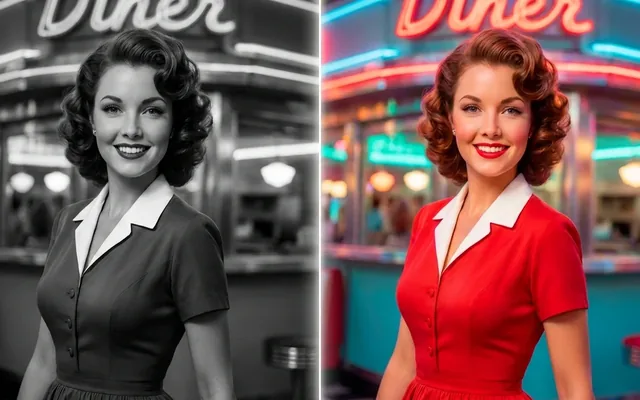
If your image is black and white, and you wish to calories it then simply create a new layer that will contain all the previous edits to create it use the shortcuts as CTRL + Alt + Shift + E on Windows or Command + Option + Shift + E on Mac. After it goes to filters then natural filter and Colorize. For non-distinctive edits use the blending option.
After successfully restoration you can download your image into your pc in different formats like JPG, PNG, or TIF.
However, Photoshop was my recommendation but as they became the age of AI and EnhanceIT PRO also Woke me with their AI features. With Photoshop you need to have some knowledge of editing and features but in EnhanceIT PRO all these adjustments are done with AI.
People think doing this work manually can be difficult but trust me it isn’t just follow the step-by-step guide and you will understand it, you need an acid-free item to purchase before starting the process.
Separate images that are stuck together. Don’t attempt to detach them from each other. Instead, you can submerge them into distilled water and check again after 30 minutes. Slowly slide them from each other and let them try first.
To remove dust and residue you have to use a soft-bristle brush and do this process carefully. If some of these images look stubborn, use warm water. Don’t rub the surface it will cause of loss of image objects.
Don’t just use tap for this process you have to use an acid-free option. You can find it at any stationery shop purchase it and use it to just remp on your image.
To fix it create an impromptu humidification chamber and for it pour water into a plastic bin and put a wire rack inside it.
After that put your curled image into the bin so it doesn’t touch water. Close the lid and come back after some hours. After it dries image under a weight.
It is not as hard as you think you just have to give it some time and tools. If you are a person who doesn’t want to do it by himself then the second method is especially for him.
Sometimes if in one thing you are not perfect and that thing is so important, you don’t want to lose it at any cost then asking for help is best. Many companies are offering this service both online and offline. You can search “ Old image restoration near” to find online services or find them yourself offline/locally.
There is an issue which is people’s budgets as these services are quite costly and this cost is out of some people’s budget they can’t afford it. The other disadvantage is that your pictures will be revealed to others too.
Think before buying any service online. Moreover, it is best for those who don’t have time or skill to do that but you can use EnhanceIT PRO’s AI for it does your work online for free.
You gonna love this method as for this you don’t have to invest your money for the restoration of images. People are offering such applications that can help you restore your images just by downloading these apps. If you’re thinking it isn’t possible then check the following list of best apps.
With EnhanceIT PRO’s AI, restoring old photos is a very easy process. This tool specializes in color correction and detail enhancement of old images, allowing you to breathe new life into black-and-white images with just a few steps.
NERO AI is For advanced restoration, NERO AI offers many tools to fix blemishes, scratches, and even missing parts of your old photo. Its smart algorithms ensure that your photos look as good as the latest pictures are.
Also Read: How to Enhance Text in a Photo: Best Free Tools to Unblur Text
FixMyPics is Ideal for quick fixes in your images, FixMyPics lets you sharpen your blurry images and restore their color balance. It’s perfect for those who just want a simple, yet effective solution of old image upscaling.
Fotor is Known for its wide range of editing features as Fotor provides tools from basic to advanced for photo restoration. It also includes options for noise reduction and image retouching.
If you have a collection of old printed photos then photomyne is a must-have application. It allows you to scan and restore multiple photos at once just like batch enhancing which EnhanceIT PRO’s AI offers too and preserving your memories digitally with enhanced clarity.
Face Restore’s main focus is on your facial restoration and Face Restore works beautifully on old portraits. what it does It simply smooths out wrinkles, repairs damage, and enhances facial details to give the subject a youthful appearance.
You need to know that Remini uses cutting-edge AI to sharpen and enhance your old, low-resolution images. Which makes It perfect for restoring details of your old images that may have faded.
Adobe Lightroom offers professional-grade tools and features for restoring old photos. With its powerful editing features, you can easily restore every aspect of your image, from exposure adjustments to color grading.
We have lots of memories and sentiments with our old images. By securing them we save our old memories and attached lessons too. Here are the best 3 ways to preserve old photos:
To preserve your images permanently store them in a stable environment where temperature and humidity are moderated. Avoid exposing and touching them and regularly take a look at them to ensure any starting damage. Store images away from light and use UV-filtered glazing for frames.
There is too much advanced equipment and professionals who use advanced techniques to restore images so if your resources/images are so important try using such a service it will be costly too so if affordable then try it and if your budget does support you then use EnhanceIT PRO’s Ai.
Another free way to preserve your images is to digitize them by using a scanner or mobile camera. By doing that you will receive a copy of the original image and you can restore that image using online tools or web-based editors.
If you aren’t an expert you can restore images by yourself or by using AI tools. So if you do not have time to do it yourself then you can hire someone or use AI tools and those people who can not afford paid services can use Free AI tools to restore images effectively. So it’s up to you what suits you the best.
We’ve provided you with all solutions for every type of person but the best-recommended method is to use apps or our EnhanceIT PRO’s AI tool. It is available online and it is easy to use, you can restore your images easily because you just have to upload your image in it and the further adjustments are on AI.
How can I improve the quality of an old photo?
To improve your image quality you can use AI tools (EnhanceIT PRO’s AI recommended), restore it manually by yourself, or hire someone professional.
How to make old photos look new?
To change your old images’ look you can sharpen and colour your images using Photoshop or AI tools.
Is there an app to enhance old photos?
Yes, many apps can be used to enhance old images and the best of them are Face Restore, fotor, and Fixmypic.
What is the best online AI tool to enhance my old pictures?
EnhanceIT PRO’s AI tools are the best online image restoration tools which are free and quite well for enhancing your old images. It makes them similar to the latest images.
📖 More in Photo Enhancement & Quality
Water is the absolute worst enemy of old family photographs. A leaky roof, a flooded basement, or a spilled drink can instantly ruin a physical…
Every family has a box of old photographs sitting in a closet or an attic. These pictures are our only connection to our great-grandparents and…