
Restore Old and Damaged Photos
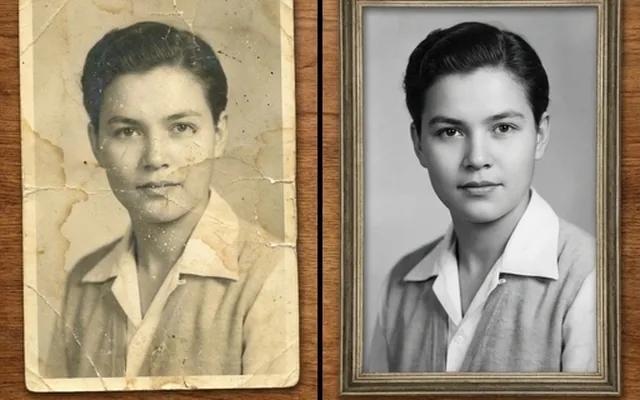
Restore old, damaged photos with our free AI tool. Fix scratches, tears & fading in 60 seconds—6× faster than others. Bring memories back to life instantly!
What people use it for
Torn and creased prints
Physical damage — tears, creases, missing corners — reconstructed from the surrounding image.
Faded colour
Colour prints and negatives shift towards magenta as the dye layers fade at different rates. Correcting that by hand is slow; this is not.
Water and mould damage
Staining and spotting from damp storage, which is the most common way a family archive degrades.
Scratched negatives and slides
Surface scratches and dust that a scanner picks up as bright lines.
Getting the best result
- Scan rather than photograph, at 600 DPI or higher. This is the single biggest factor in the result.
- Scan the whole print including the border — the undamaged edge tells the model what the paper and tone should look like.
- Restore before colourising. Colourising damage produces coloured damage.
- Keep the raw scan forever. The restored version is an interpretation; the scan is the record.
You might also like


Frequently asked questions
Can it restore a face that is badly damaged?
It will reconstruct one, and that is worth being careful about. Where a face is partly missing, the model generates a plausible face, not the actual person's. For anything where identity matters, compare against another photograph of the same person.
Does it work on black and white photographs?
Yes. It handles the damage, the contrast and the tonal range while keeping the image monochrome. Colourising is a separate, optional step.
How old can a photograph be?
Age is not the constraint — condition is. A well-kept print from 1900 restores better than a water-damaged one from 1990.