
Unblur and Sharpen Photos
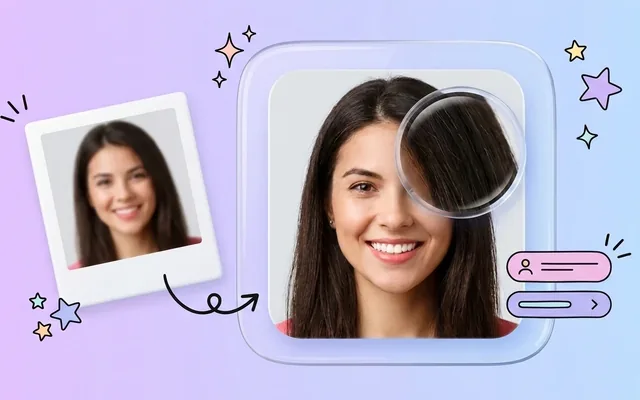
Fix blurry, soft, or out-of-focus photos instantly with our free AI image sharpener. Restore crisp edges and fine detail online.
What people use it for
Camera shake
Slight motion blur from a handheld shot at too slow a shutter. The most recoverable kind of blur there is.
Missed focus
A portrait focused on the ear rather than the eye. Recoverable up to a point — the further out the focus, the less is there.
Soft scans
Flatbed scans of prints often come back soft because of the glass and the print's own surface.
Video stills
A frame grabbed from video is soft by construction, thanks to motion blur and heavy compression.
Getting the best result
- Sharpen once. Two passes stack halos on edges and the result looks brittle rather than sharp.
- Sharpen before upscaling. Enlarging a soft image enlarges the softness with it.
- Look at high-contrast edges first — a dark branch against sky is where over-sharpening shows before anywhere else.
- If the photo is noisy as well as soft, enhance first: sharpening amplifies noise into something that looks like grit.
You might also like
 HOT
HOT
Image Enhancer
Instantly improve image quality.
1 credits · Free 4K
4K
Image Upscaler
Upscale images up to 4K resolution.
1 credits · Free
Text Clarifier
Make blurry text in photos and scans readable.
7 credits · Free
Photo Restore
Repair tears, creases, stains and fading in old photos.
2 credits · FreeFrequently asked questions
What is the difference between this and enhancing?
Sharpening targets one problem: lost edge definition. Enhancement does that plus noise, compression and colour. If the photo is only soft, sharpening keeps everything else untouched.
Can it fix badly blurred photos?
It depends on the kind of blur. Directional motion blur is partly reversible because the underlying detail is smeared but present. Severe defocus is not — there is nothing left to reverse.
Why does my photo look grainy afterwards?
Sharpening raises local contrast, and noise is local contrast. Run the enhancer first to remove the noise, then sharpen.