
AI Anime and Manga Upscaler
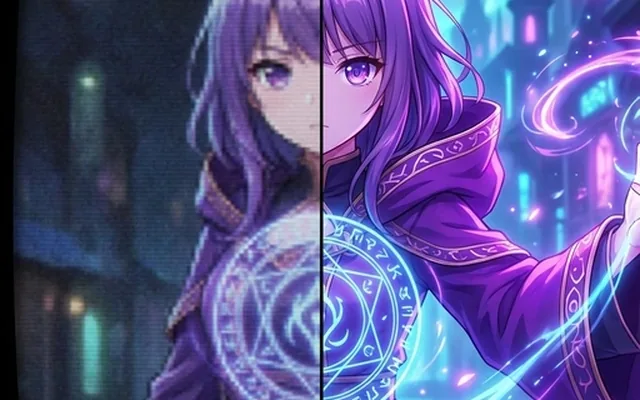
Upscale anime, waifu & manga images to stunning 4K with our free AI tool. Fix blur & pixelation instantly. No watermarks. No quality loss. Try now!
What people use it for
Old anime screencaps
DVD-era and broadcast captures are 480p and heavily compressed. General-purpose upscalers smear the line art; this does not.
Scanned manga pages
Halftone screentone is exactly what a photographic model gets wrong, turning dot patterns into grey mush.
Low-resolution fan art
Artwork saved small or re-uploaded through several sites, where the outlines have gone soft.
Sprites and pixel-adjacent art
Game art and older illustration with hard edges that photographic upscaling rounds off.
Getting the best result
- Use this rather than the general upscaler for anything drawn. The difference is largest exactly where it matters — clean line weight and flat colour.
- Find the cleanest source you can. A screencap re-encoded twice has lost the line edges the model needs.
- For manga, scan at high resolution so the screentone dots survive as dots rather than as grey.
- Check hands and small background details — these are as hard for anime models as they are for everything else.
You might also like
Frequently asked questions
Why not just use the normal upscaler?
Photographic upscalers are trained to add texture, which is right for skin and fabric and wrong for a flat-shaded cel. They soften the line art and invent grain that was never in the drawing. This model is trained on illustration and preserves both.
Does it work on manga and comics?
Yes, and screentone is handled specifically — that is the case general models fail most visibly.
Can it colourise black and white manga?
No, that is the colouriser's job, and results on line art are less predictable than on photographs. This tool sharpens and enlarges what is already there.