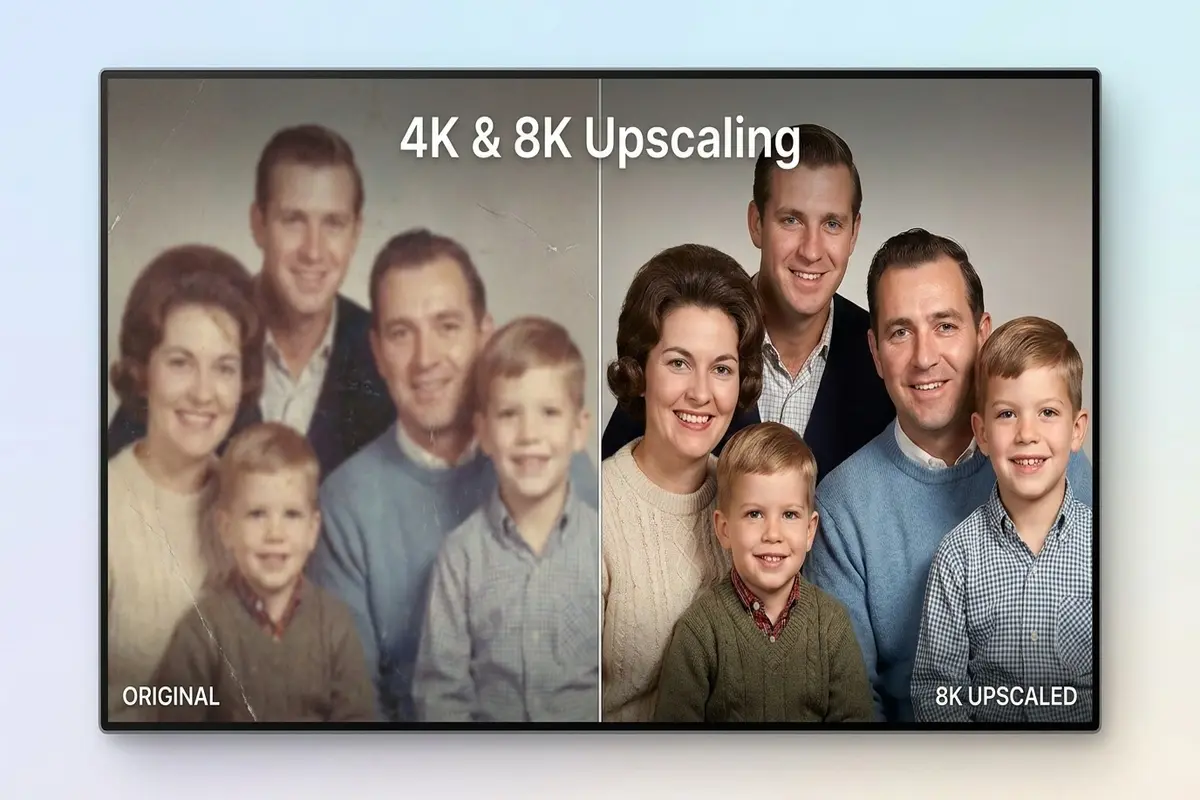

Old photos deserve a second life. Low-resolution images from early smartphones or scanned family pictures often look blurry on modern screens. AI upscaling technology now makes it possible to transform these memories into sharp, detailed prints worthy of any wall. The process takes seconds and requires zero technical expertise.
Why resolution matters for print and display
Screen sizes keep growing rapidly. A photo that looked fine on a 720p monitor appears pixelated on a 4K television. The math is simple but unforgiving. A 1080p image contains about 2 million pixels. A 4K display needs over 8 million pixels to fill every dot cleanly.
Print demands even more resolution than screens. Paper shows every flaw that displays hide. Consider these minimum requirements for quality prints:
| Output Size | Minimum Resolution | Ideal Resolution |
|---|---|---|
| 8×10 inch print | 2400×3000 px | 3600×4500 px |
| 16×20 poster | 4800×6000 px | 7200×9000 px |
| Large canvas | 8000×10000 px | 12000×15000 px |
Stretching a small image to fit these dimensions creates ugly artifacts. The edges blur noticeably. Fine details disappear completely. Colors muddy together into blocky patches. Traditional resizing algorithms simply cannot add information that does not exist. This is where AI photo enhancement changes everything about what we can recover from old images.
Modern displays punish low-resolution content mercilessly. That phone photo from 2010 looked acceptable on the screen it was taken for. Today it looks like a blurry mess on your living room television. The gap between old content and new displays grows wider every year.
How AI upscaling actually works
Traditional upscaling simply duplicates pixels in predictable patterns. The result looks soft and unnatural because the algorithm invents nothing new. AI takes a completely different and much smarter approach to the problem.
Neural networks study millions of high-resolution images during training. They learn patterns that humans never explicitly program. They understand intuitively how sharp edges should look. They recognize textures in skin, fabric, foliage, and countless other surfaces from their training data.
When you feed a low-resolution photo to an AI upscaler, it does not just stretch pixels mechanically. It predicts what details should exist between them based on context. The algorithm fills gaps with realistic information pulled from learned patterns stored in the model.
- Edge reconstruction sharpens boundaries between objects naturally
- Texture synthesis adds realistic grain to skin and surfaces
- Color enhancement corrects fading and improves overall vibrancy
- Noise reduction removes digital artifacts from old camera sensors
- Detail hallucination creates plausible fine details from context
The technology works remarkably well on portraits, landscapes, and product shots. Results improve significantly when the source image has decent lighting and reasonable focus. Garbage input still produces garbage output, but the threshold for acceptable input dropped dramatically.
Different AI models specialize in different content types. Portrait-focused models enhance facial features specifically. Landscape models emphasize foliage and sky textures. General-purpose models balance everything reasonably well for mixed content.
Step by step process for best results
Getting clean 4K or 8K output requires some preparation before processing. Follow these steps for optimal results with any AI image upscaler.
Start with the highest quality source you have available. Dig through old hard drives thoroughly. Check cloud backups from years past. Even a slightly better original makes a noticeable difference in the final output quality. The AI amplifies both good qualities and flaws equally.
Clean the image first if needed before upscaling. Remove scratches from scanned photos manually. Crop out damaged edges that distract from the subject. Fix major color issues and exposure problems before processing. The AI works better with cleaner input and produces fewer artifacts.
Choose the right upscale factor for your specific needs. Going from 1080p to 4K requires a 2x increase. Reaching 8K from 1080p needs 4x scaling. Larger jumps produce more AI-generated details and potentially more visible artifacts where the model guessed wrong.
- Upload your prepared image to the upscaling tool
- Select your target resolution or preferred scale factor
- Enable face enhancement specifically for portrait images
- Process the image and download the full result
- Compare original and result closely at 100% zoom
Multiple passes sometimes help stubborn low-quality images. Upscale 2x first and examine the result. Then run that output through again at 2x for a total 4x increase. This gradual approach often beats a single aggressive 4x jump because each pass can correct the previous one.
Save your results in lossless formats like PNG or TIFF. Converting back to heavily compressed JPEG defeats the purpose of upscaling by destroying the details you just created.
Common mistakes to avoid
Not every upscale attempt succeeds perfectly. Understanding common failure modes helps you achieve better results consistently and recognize when an image simply cannot be saved.
Heavy JPEG compression destroys information permanently. Those blocky artifacts in heavily compressed images cannot be recovered by any technology. They get amplified during upscaling instead of disappearing. Always work from the least compressed version available when you have options.
Extreme enlargement has practical limits regardless of AI quality. Even the best algorithms cannot invent details that never existed in any form. Trying to turn a tiny 200×200 pixel thumbnail into a poster-sized print produces disappointing results every time. Aim for 2x to 4x scaling for realistic expectations.
- Avoid upscaling images that were already upscaled previously
- Skip images with severe motion blur as AI cannot fix fundamental capture issues
- Watch carefully for AI artifacts appearing in hair and fine repetitive patterns
- Check faces closely for unnatural smoothing that removes character
- Examine text in images since AI often mangles letters and numbers
Some subjects challenge AI more than others predictably. Complex repeating patterns like chain-link fences confuse the algorithms badly. Text embedded in images frequently gets distorted or smoothed into illegibility. Always inspect critical areas carefully before committing to a large expensive print order.
The AI sometimes creates details that look plausible but are completely fictional. Faces may gain freckles that never existed. Fabric patterns may shift subtly. These hallucinations usually go unnoticed in casual viewing but matter for archival accuracy.
Practical applications worth trying
The technology opens creative possibilities that simply did not exist before these tools became available. Consider these real-world applications for AI upscaling.
Family photo restoration becomes accessible to everyone without professional help. That faded wedding photo from 1985 can now hang proudly as a large canvas print in your home. Grandparents seeing their youth rendered in sharp detail creates powerful emotional moments that technology rarely delivers.
E-commerce sellers benefit enormously from upscaling capabilities. Product photography shot on older equipment or budget cameras can reach modern professional standards without expensive reshoots. Consistent high-resolution images across an entire catalog improve conversion rates measurably.
- Restore vintage family photographs for gifts and displays
- Upscale product images for demanding e-commerce platforms
- Enhance real estate listing photos to attract more buyers
- Improve surveillance footage clarity for identification purposes
- Create large gallery prints from casual phone snapshots
Digital artists increasingly incorporate AI upscaling into their creative workflows. A rough concept sketch becomes a detailed illustration ready for clients. Rough thumbnails transform into polished portfolio pieces. The barrier between initial idea and final execution shrinks dramatically.
Archivists use the technology to preserve historical photographs for future generations. Museums can display enhanced versions while protecting fragile originals. The cultural value of making history visually accessible cannot be overstated.